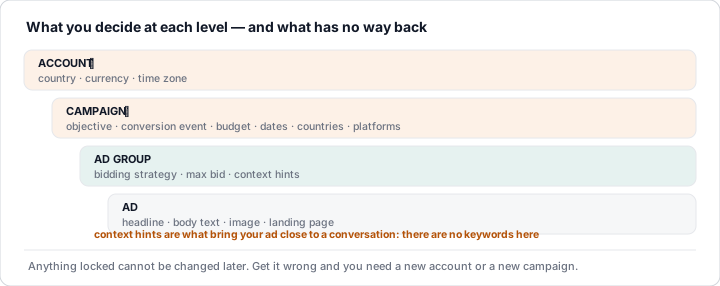
If you come from Google Ads, the structure will feel familiar: campaign (objective, budget, schedule and targeting), ad group (bid and context hints) and ad (title, body text, image and URL).
What won't feel familiar are the gates that have nothing to do with your ads: we had eight approved ads, a bid that wasn't low and not a single impression, and the diagnosis gave the reason: the account's brand review was still in progress.
1. Sign-up in five steps
- Create the account in Ads Manager (ads.openai.com), using your OpenAI account.
- Onboarding and verification: business details (name, website, logo and industry), account details (country, currency and time zone) and some verification questions with Persona. Then a queued review that cannot be sped up.
- Account information: in Settings → Account info, the name and logo exactly as they will appear in your ads. Without this, nothing serves.
- Billing: billing profile and card; without them, campaigns don't deliver.
- Team: invite colleagues in Settings → Users → Invite.
⚠️ Pitfall: country, currency and time zone cannot be changed once the account is created; if you get them wrong, you have to open another account. And while it is under review, don't send duplicate requests: they don't speed it up and they cause confusion.
2. Agencies: one account per advertiser
Each advertiser needs its own account and an agency cannot create it on the client's behalf: the client opens it and then invites the agency. One user can belong to several accounts and switch between them, but there is no MCC-style manager account grouping them. Roles: Admin, Member and Viewer.
3. Reviews that hold up delivery
The platform distinguishes the brand review (changing your brand may trigger a new one) from the account integrity review. Delivery is blocked by a pending review, an exhausted spend cap or campaign issues: switching things on is not enough.
4. The objective, with no way back
There are three: Views, Clicks and Conversions. The objective cannot be changed later, and neither can the chosen conversion event: get it wrong and you need a new campaign.
| Objective | How you pay |
|---|---|
| Views | Per impression (CPM bid) |
| Clicks | Per valid click (CPC) |
| Conversions | Per valid click (oCPC), optimising towards the conversion |
Note: Conversions charges per valid click, not per conversion, and needs a single active standard event with enough volume (lesson 3); without it, start with Clicks.
5. Budget, bidding and targeting
Budget: daily or lifetime, one or the other (a daily budget can't be turned into a lifetime one). Bidding: fixed (you set the maximum) or automated, maximise clicks or maximise conversions, with no maximum and a daily budget required. For CPC, OpenAI recommends starting with a maximum bid of $3-5; the low-bid warning is guidance, not a block.
You target by locations (countries or regions, to include or exclude) and platforms (iOS and Android apps, and web: desktop, iOS web and Android web). Custom audiences are not supported in campaigns targeting the European Economic Area or Switzerland: they don't count for Spain (they do in markets such as the US). The documentation offers no targeting by age, gender, interests, language or time of day. Ours: Clicks, maximise clicks, $25/day and Spain.
6. The ad group and its hints
Context hints describe the conversations where you fit; they guide, but don't guarantee delivery. Ads Manager created a "Recommended ad group" for us on its own, with four hints already written in Spanish, along the lines of "Google Ads professionals in Spain looking to automate campaigns and save time". Read them before switching on (more in module 17 of the Advanced level).
7. The ad
- Title of 3 to 50 characters and body text of up to 100.
- Image required (JPEG, PNG or WebP; at least 640×640 according to the official documentation). Ours: 1080×1080.
- URL (http or https) of up to 2,048 characters, accessible to OpenAI's crawlers and with UTM parameters, which carry through on the click.
Editing the creative creates a new version and a new review, including when you fix a rejection. Don't imitate the ChatGPT interface, and only promise what the landing page delivers: we withdrew two "free ebook" ads whose ebooks were only free for subscribers.
8. Everything starts paused
Everything is created paused; an ad only serves when its ad group and campaign are active. Switch on the ads and the ad group, and leave the campaign until last: it becomes your master switch.
💡 Ninja trick: whatever you want to retire, archive it. We paused two ads, and a bulk "activate all" in Ads Manager switched them back on.
Before switching on
- Account complete: information, billing and reviews finished.
- Right objective, and a daily budget if bidding is automated.
- Countries, platforms and exclusions checked.
- Hints read and ads approved, with UTMs and a consistent landing page.
- Measurement working (lesson 3).
What to remember
- Country, currency and time zone can't be changed: get them wrong and you need a new account.
- The client opens the account and invites the agency. There is no MCC.
- Approved doesn't mean served: without a complete account and finished reviews, nothing serves.
- The objective can't be changed; Conversions charges per valid click.
- Everything starts paused; whatever you retire, archive it.