Since 31 August 2026, businesses in 31 European markets, Spain among them, can advertise inside ChatGPT on a self-service basis. The platform is called ChatGPT Ads, and OpenAI's self-service tool for it is the Ads Manager (in Spanish, «ChatGPT Anuncios» and «Gestor de anuncios»).
If you come from Google Ads, forget your favourite tool: there are no keywords here; the conversation chooses the ad. In this module you will see how it works, how to set up your first campaign and how to measure it, with what we learnt setting up ours.
Where it appears and what it looks like
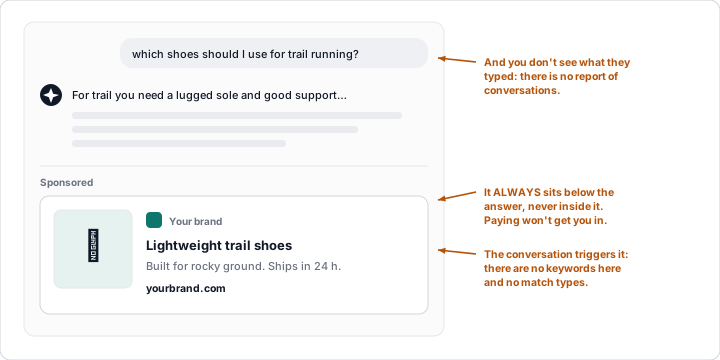
Below the end of a response, labelled as sponsored and visually separated from it; there may be one unit or several. The card carries the advertiser's name, favicon (the logo), title, body text, image and a link to the landing page.
Ads don't influence what ChatGPT answers (they run on separate systems). Paying doesn't get you into the answer; it places you underneath it.
Who sees it, and where it never appears
| User | Sees ads? |
|---|---|
| Free and Go plans | Yes |
| Free with the ad-free option (and lower limits) | No |
| Plus, Pro, Business, Enterprise and Edu | No |
| Under-18s (according to the account and age prediction) | No |
| Temporary chats and the ChatGPT Atlas browser (during the trial) | No |
Ads never appear near sensitive or regulated topics: personal health, mental health and politics. The placement policy also rules out, among others, sexual content, graphic violence, hate, gambling, weapons and contexts of emotional dependency.
What the advertiser receives
Very little, and by design: no conversations, history or memories, and no name, email, precise location or IP address. Only aggregated data, such as views and clicks. Nor is there any report of conversations or queries: nothing like the search terms report (lesson 3).
How the ad is chosen
By expected relevance and results. What counts: the context and intent of the conversation, your landing page, your title and body text, your context hints and your targeting; with personalisation, also past chats, memory and interaction with ads.
Context hints are set at ad group level and describe the conversations or topics in which your product fits (OpenAI's own example: "Lightweight trail running shoes for rocky terrain"). They guide matching, but they are not exact match and they don't guarantee delivery. Among several eligible ads, a second-price auction weighted by relevance decides.
| Google Ads (Search) | ChatGPT Ads | |
|---|---|---|
| What triggers the ad | Your keywords | The conversation |
| Match types | Exact, phrase and broad | None |
| What the user typed | Search terms report | No report |
In Europe, no personalisation
Personalised ads are not initially available in the European Economic Area or Switzerland. There, Spain included, the context of the conversation rules; what you can move is your hints, ad, landing page and targeting.
💡 Ninja trick: write for the conversation, not the person. Before drafting a hint or a title, ask yourself what someone would be asking just before seeing your ad.
Timeline
| Date | Milestone |
|---|---|
| 9 Feb 2026 | Trial in the US; 8 more markets later |
| 18 Aug 2026 | 31 European markets announced (Spain included), first through OpenAI's sales team, agencies and technology partners |
| 31 Aug 2026 | Self-service in those 31 markets (ads.openai.com) |
| Sept 2026 | Self-service in 52 countries (third-party figure) |
What can be advertised today
The policies (v1.6, September 2026) focus this phase on consumer and household goods, local services, travel and entertainment, and digital products and education. Banned today, among others: adult content, alcohol and tobacco, counterfeits, gambling, political content, recreational drugs, scams, unsubstantiated wellness claims and specific job or housing offers (platforms without a specific offer are fine).
Basic rules: nothing misleading, professional language, no discrimination and no imitating the ChatGPT interface; the landing page must match the advertiser and the offer.
⚠️ Pitfall: relying on US case studies. There, financial, health and legal services are accepted case by case; outside the US they are generally prohibited.
Is it right for my business?
- Is your category allowed where you advertise?
- Do your customers ask ChatGPT about the problem you solve? That is where your hints will live.
- Will your landing page pass review? It must be accessible to OpenAI's crawlers and consistent with the ad (lesson 2).
- Can you measure, and are you fine with a young platform with no query report? (lesson 3).
Four yeses? Give it a try. Ours, set up in September, has no results yet: what we share here is the set-up.
What to remember
- It appears below the response, labelled as sponsored, and doesn't influence what ChatGPT answers.
- Free and Go users see it; Plus, Pro, Business, Enterprise and Edu don't, nor do minors or temporary chats.
- No keywords: the conversation, your hints, the ad and the landing page decide.
- In the EEA and Switzerland there is no personalisation: the conversation's context rules.
- Self-service in 31 European markets since 31 August 2026; financial, health and legal services are generally banned outside the US.