The previous lesson covers what to measure and with what. This is the other half, the one no guide includes: where each screw is tightened in Ads Manager, and in what order.
It isn't paperwork. We did it "right" and still spent days sending conversions the platform received and counted as none. By the end of this lesson you'll know why, and how to see it in two clicks.
The map: everything hangs off Tools → Conversions
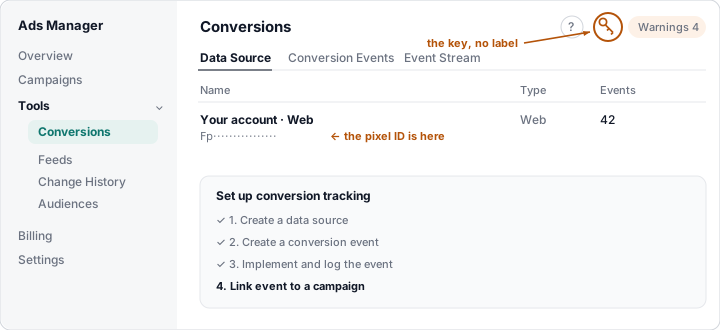
Three tabs and one hidden icon:
| Where | What you find |
|---|---|
| Data Source | Your data source and, under its name, the pixel ID (it starts with Fp) |
| Conversion Events | The conversion actions: the ones you create |
| Event Stream | What is arriving, event by event |
| Key icon, top right | The "Conversion keys" panel: the key for sending from your server |
The key icon has no label and sits between the ? and "Warnings".
It's the one nobody finds first time. Open it, click "+ Create new
key", give it a name and copy it right then: it's shown only once.
⚠️ Trap: that key is not the account management one (in the Ads Manager settings). Two different keys for two different doors, and mixing them up gives you an error that explains nothing. Both live on your server, never in your website's code.
Sending isn't measuring
Here's the big trap, and it's counter-intuitive:
The platform does not create conversion actions for you. If your server sends an event and no action exists with that base event, the event goes through fine —your developer sees a good response— and nobody counts it. It appears in no report. No warning tells you the action is missing.
Our own case, measured in September 2026: for days we sent the sign-up event and the platform accepted it without a single complaint. When we finally created the action, 22 conversions appeared at once that had been there the whole time. Meanwhile the report said zero.
💡 Ninja trick: the Event Stream tab settles it in ten seconds. If you can see your events arriving there but the report says zero, you don't have a sending problem: you're missing the action.
Creating the conversion action
In Conversion Events → + Create → Conversion Event:
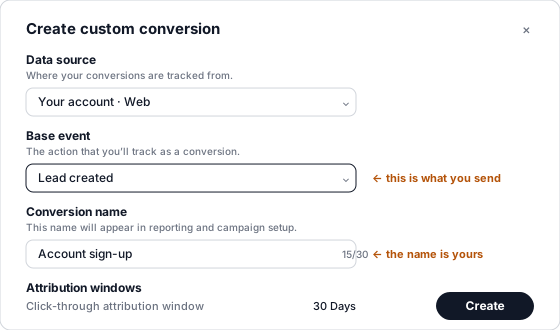
Four fields, and a couple of things worth understanding:
- Data source: yours. With only one, there's nowhere to go wrong.
- Base event: picked from a closed list (registration, lead, purchase, appointment, subscription, trial…). It has to be exactly the one your server sends. This is the field that matches; if it doesn't line up, you're back in the previous section.
- Conversion name: 30 characters and it's yours. It's the label you'll see in reports and when setting up the campaign, so give it a name you'll understand in six months ("Account sign-up", not "Conversion 2").
- Attribution windows: 30 days click-through, 1 day view-through. The view-through one only reports: optimisation and billing go by click.
Repeat this once for every distinct event you send. Send four, and you need four actions.
A campaign gets ONE event
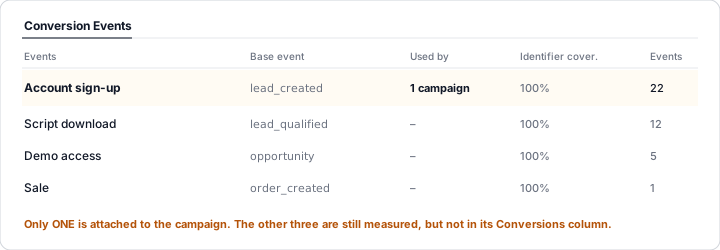
The "Used by" column tells you how many campaigns each action is attached to, and that's where two expensive mistakes happen:
- Attaching two actions that describe the same thing. If you measure the sign-up by two routes and attach both, the campaign's "Conversions" column adds them up: one person, two conversions.
- Attaching the stages as well. Attach sign-up, qualified, opportunity and sale to the same campaign and a customer who walks the whole funnel counts four times. The column stops meaning anything.
The right answer is one action per campaign: the one that represents the result you're chasing. The rest keep being measured —each with its own count in this table— but they don't enter the campaign's column.
And since ChatGPT Ads has no value-based bidding, choosing which of your events the campaign counts is the only lever you have to ask the bidding for quality. Optimising towards "sign-up" brings volume; optimising towards "customer who actually used the product" brings quality, if you get enough of them per month for it to learn.
Reading the table without fooling yourself
- Identifier cover.: the share of your events that arrive with something to match on (the click identifier or the hashed contact detail). It's the column that really matters for attribution. If it drops, you're losing the trail somewhere.
- Events: the ones received, not the conversions attributed. It's normal for them to be far more: most don't come from an ad.
- The warnings are informational and almost always have a calm explanation: "no active campaigns use conversion events" shows up when your campaign is paused; "no recent events" shows up after a day without conversions.
⚠️ Trap: a conversion action isn't deleted, it's archived ("archiving hides it from future campaign configuration"). Think about the name before you create it.
What to remember
- The pixel ID is in Data Source; the conversions key is behind the unlabelled key icon, and it's shown only once.
- The platform doesn't create the actions for you: without the action, your events arrive and count zero, silently.
- Event Stream tells "not arriving" from "arriving and not counted" in ten seconds.
- One action per event you send; the name is yours, what matches is the base event.
- One event attached per campaign, or you count the same person several times.
- With no value bidding, choosing that event is your only quality lever.