In short: to Google a lead is a submitted form; to your business it's the start of a five-stage funnel Google can't see. The calculation that changes everything is the real cost per customer (CPA ÷ raw-to-sale rate): the "expensive" campaign is usually the cheap one. Optimising for forms brings more leads and worse ones, so the problem gets worse on its own.
To Google, a lead is a form submitted. To your business, a lead is the start of a funnel where most of them fall away. This module covers lead quality in depth — the Lead Rating methodology — and it starts with the real funnel and what it costs to ignore it.
Which stages are there between a lead and a sale?
| Stage | What it is | Who knows about it |
|---|---|---|
| Raw | Form, call, chat | Google (instantly) |
| Contacted | Somebody answered | Sales |
| Qualified | They are the right kind of customer and they have the need | Sales / CRM |
| Proposal | Quote sent / visit made | CRM |
| Closed (sale) | Signed / paid, with an amount | CRM / invoicing |
| Lost | At any stage; with a reason | CRM |
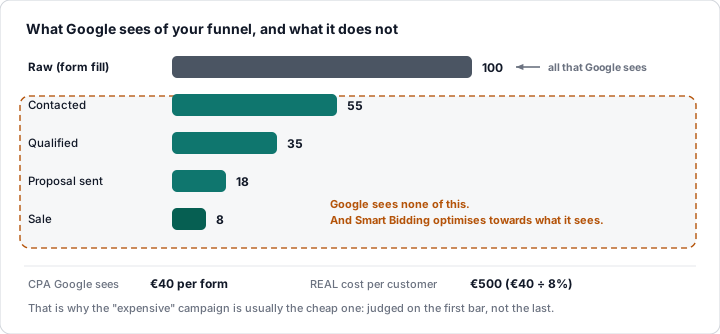
Google only sees the first one unless you take the rest to it. And Smart Bidding optimises towards what it sees.
Which conversion rates are normal at each stage?
| Sector | Raw → qualified | Qualified → sale | Raw → sale |
|---|---|---|---|
| Local services (home improvement, dental) | 50-70% | 25-40% | 15-25% |
| B2B (software, consulting) | 20-40% | 10-25% | 3-8% |
| Training | 30-50% | 15-30% | 5-12% |
| Property | 20-35% | 3-8% | 1-3% |
| Insurance / finance | 30-50% | 10-20% | 4-8% |
The spread is enormous, and it is just as wide inside each account: by campaign, by keyword, by network, by time of day. That spread is the information Google does not have.
How do you calculate the real cost per customer?
Google's CPA = cost / forms
Real cost per customer = cost / sales = Google's CPA / (raw → sale rate)
With a CPA of €40 and a raw → sale rate of 8%, every customer costs €500. If campaign A has a CPA of €30 and a rate of 4% (a customer at €750) and campaign B has a CPA of €50 and a rate of 12% (a customer at €417), the "expensive" campaign is the cheap one. Google, with no funnel data, will move budget towards A.
What happens if you optimise for forms?
When the primary conversion is the raw form, Smart Bidding learns which people fill in forms: the curious, students, competitors, bots, people outside your service area. Over time, the campaign brings in more forms, and worse ones: the CPA falls, the cost per customer rises, and the report says everything is fine. It is the SaaS case from the Basic level (400 "conversions", 11 demos) and the reason lead quality is a problem that gets worse on its own.
Why does scoring leads pay off?
There are two ways to break the circle:
- Upload the stages to Google as offline conversions (qualified, sale): Smart Bidding learns from customers. It works, but it arrives late (days or weeks) and with little data (sales are scarce).
- Score every lead instantly with what you already know about them (behaviour, details, source) and upload that score as the value of the raw lead: Smart Bidding gets an immediate and plentiful signal of estimated quality, and the real stages correct it afterwards.
The second is lead scoring; the first is its recalibration. Together, they turn "forms" into "probable customers" from day one. The return: in real accounts, a third more useful leads on the same spend within two months — and a Google CPA that rises (because it counts fewer things) while the cost per customer falls.
What do you need to measure lead quality?
- A CRM (or a spreadsheet) where somebody marks the stages.
- The GCLID (or email/phone) stored per lead.
- An agreement with the sales team: marking is compulsory.
- A shared definition of "qualified".
Without that, scoring stays a prediction with no truth behind it. With it, the whole module becomes possible.
💡 Ninja trick: Lead Rating was designed as a general system (not for one client): its own spreadsheet per client, a 0-100 rating per lead with its three layers, three offline conversions (Raw = the rating, Qualified, Sale with an amount) and checkboxes in the sheet so sales can mark the truth. The next lesson takes it apart layer by layer.
What you should remember
- Between the form and the sale there are five stages Google cannot see.
- Real cost per customer = CPA ÷ raw → sale rate: the "expensive" campaign can be the cheap one.
- Optimising towards forms brings more and worse: the problem gets worse on its own.
- The solution: score instantly + recalibrate with the CRM; it needs a GCLID, a CRM and a sales team that marks.