In short: Google can spend up to double your daily budget on any given day, but never more than your average budget multiplied by the days in the month. So "I set €10 and got charged €19" is not an error: it evens out over the month. And "limited by budget" doesn't always mean you should raise it: sometimes it means you should narrow who you're talking to.
The budget is the simplest setting in Google Ads and the one that gives the most surprises in the first month: «I set €10 a day and yesterday it charged me €19». That is not a bug. It is how it works, and it is worth understanding before you judge anything.
Why does Google spend more than my daily budget?
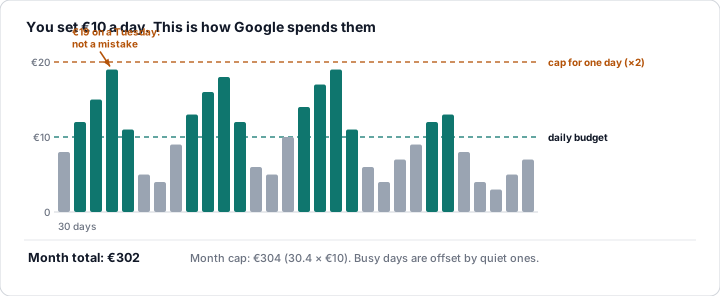
What you set per campaign is an average that Google commits to respecting over the month, not every day. Two rules:
- Daily cap: on any given day it can spend up to double the daily budget (€10 → up to €20) if there is more search potential that day.
- Monthly cap: the month's spend never exceeds 30.4 × the daily budget (€10 → €304/month). High days are offset by low days.
If you raise the budget mid-month, the monthly cap is recalculated proportionally. If you change the budget often, the average stops meaning anything: every change restarts the calculation.
What does "limited by budget" mean?
When Google could show your ad more often but the budget doesn't stretch, the campaign shows the status limited by budget and, in the columns, the lost impression share (budget) (Module 1, metric 10). It means one thing: «there is more demand than you are buying».
That is not necessarily bad. It is bad if the campaign is profitable (every extra euro would bring conversions at the same CPA): then you are leaving sales on the table. It is irrelevant if the campaign does not convert well: more budget would only buy more of the same.
When the budget doesn't stretch, Google does not cut the day off at 2 pm: it spreads the impressions across the day (it enters fewer auctions). That is why a limited campaign has fewer impressions spread out, not half a day of nothing.
How much budget should you start with?
Three ways to arrive at a sensible figure:
- From the CPC: if Keyword Planner estimates a CPC of €1.50 and you want at least 10-15 clicks a day to have data, you need €15-25/day. Fewer than about 10 clicks a day takes months to yield conclusions.
- From the target: if a customer costs you (or can cost you) €40 and you want 1 a day, €40/day is the minimum; with less, days without a conversion will be the norm and you won't be able to judge.
- From what you can afford to lose: the first month is learning. Set what you can spend without demanding immediate profitability; what you learn is worth the money.
And a rule for growing: when a profitable campaign is limited by budget, raise it 10-20% at a time and wait a week. Doubling in one go changes the auctions you enter and the CPA usually suffers. When lowering the budget, Google Ads now warns you with a forecast of the conversion value you could lose: weigh it before cutting.
Should you use shared budgets?
Several campaigns can share a single pot: Google distributes the money according to where it performs best. Useful when you have similar campaigns and you'd rather the total was not wasted on one while another falls short. Less useful when you want to guarantee spend to a specific campaign (brand, a launch): in that case, give it its own budget.
💡 Ninja trick: the budget is the setting most often changed «by eye» and with the worst consequences: cutting the campaign that converts because «it spends a lot», or raising the one that doesn't convert «to see if it takes off». Our Guardian watches every campaign daily — spend against target, limited campaigns with a good CPA, abnormal spikes — and warns you before the month goes off course. Moving money should be a decision made with data, and the data is in the lost IS (budget) against the CPA.
What you should remember
- The daily budget is a monthly average: one day it can spend double; the month never goes above 30.4 times the daily figure.
- Limited by budget only matters if the campaign is profitable.
- First budget: enough for 10-15 clicks/day or for the target CPA; the first month you pay to learn.
- Raise it 10-20% at a time; every budget change restarts the average.