In short: Google sees the form, not the sale — and as long as that stays true, Smart Bidding optimises for forms. Offline conversions are the bridge: you store the GCLID in your CRM and hand back to Google the qualified lead and the sale with its value. From then on bidding chases customers, not contacts.
Basic measurement ends at the form. But the business ends at the sale, and in between there is a funnel Google cannot see: leads who never answer, qualified leads, quotes accepted, sales with their amounts. Until it sees them, Smart Bidding optimises towards forms. Offline conversions are the bridge: telling Google what happens afterwards, tied to the click that started it.
What is the GCLID and what is it for?
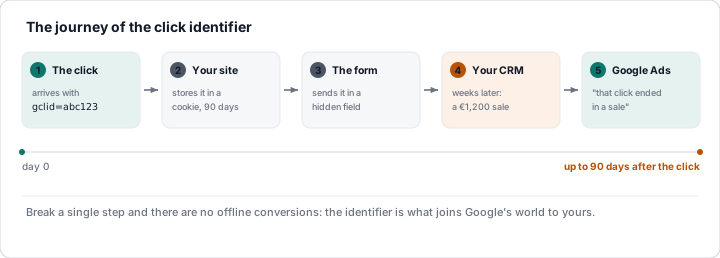
With auto-tagging on (Account settings → Auto-tagging: yes),
every ad click reaches your site with a gclid=… parameter in the URL:
the unique click identifier. If you store that value alongside the
lead, weeks later you can tell Google: "click X ended in a €1,200 sale
on day Y". Google attributes it to the campaign, keyword and time of
that click, and Smart Bidding learns from it.
How to capture it:
- A small script on the site reads
gclidfrom the URL on the first visit and stores it in a cookie (or local storage) for 90 days. - The form carries a hidden field
gclidthat is filled from the cookie when it is submitted. - The CRM (or the lead spreadsheet) stores the GCLID on the lead's record.
Without this step there are no offline conversions: the GCLID is what joins Google's world to yours.
How do you upload offline conversions?
In Google Ads you create conversion actions of the "Import from clicks" type (for example "Qualified lead", "Sale") and upload rows with: GCLID, action name, conversion date/time, value, currency. Three routes:
| Route | How | Who it's for |
|---|---|---|
| Scheduled Google Sheet | A sheet with the columns; Google reads it every day | Anyone; the way to start |
| Integrations (HubSpot, Salesforce, Zapier…) | The CRM sends the conversions itself | Anyone with a compatible CRM |
| API / scripts | Programmatic upload from your own system | Volume and full automation |
Deadlines and limits: upload within 90 days of the click; the conversion date must be later than the click; the action's conversion windows have to cover the cycle; you can upload adjustments (subtract a returned sale, change a value). There is also a shorter deadline to watch: if you upload a conversion more than 7 days after it happened, it will still show up in standard reports, but it will be left out of data-driven attribution (DDA) calculations, so the sooner it goes up, the better.
What are enhanced conversions for leads?
The evolution of GCLID-based imports: instead of the GCLID, you use the lead's email or phone number (hashed) as the identifier. The tag captures the detail in the form; when you upload the sale from the CRM with that same email, Google matches it to the click. Advantages: no GCLID to capture or store, it works across devices and it copes better with cookie loss. Google has recommended it as the main route since 2024; it coexists with the GCLID.
Which offline conversions should you upload?
| Offline action | When it is uploaded | Value | Type |
|---|---|---|---|
| Raw lead | On arrival (or measured online) | Small, or a score | Secondary or observation |
| Qualified lead | When the CRM marks it (contacted, interested, quoted) | Medium | Primary in acquisition |
| Sale | When it closes | The real amount | Primary (if the cycle allows) |
With this, Smart Bidding can optimise towards qualified leads or sales instead of forms, and the reports finally tell you what a customer costs, not a contact.
What goes wrong when uploading offline conversions?
- Auto-tagging switched off, or broken by redirects that drop the parameter.
- A GCLID that never reaches the CRM: third-party forms, in-between pages, apps that do not pass it on.
- Dates: uploading the click date instead of the conversion date; or conversions outside the window.
- Duplicates: uploading the same sale several times (use an order id and adjustments).
- Long cycles: if the sale arrives at 120 days, it does not make it; upload "qualified lead" at 30 days as an intermediate signal.
💡 Ninja trick: this is the mechanism our Lead Rating is built on: it captures the GCLID (and the browsing fingerprint) of every lead, scores it and uploads three offline conversions to Google — raw with its score as the value, qualified, and sale with its amount — automatically, by bulk upload, with nobody filling in spreadsheets. The next lesson explains the values; lesson 5, the scoring.
What you should remember
- Auto-tagging + the GCLID stored in the CRM (or email/phone with enhanced conversions) is the bridge.
- Upload qualified lead and sale with its amount as offline actions: Smart Bidding then optimises towards customers.
- A scheduled sheet to start; an integration or the API to automate.
- 90 days, a date later than the click, no duplicates, adjustments for returns.