In short: Google Ads is the tool you use to buy advertising space on Google Search, YouTube, Gmail, Discover and millions of websites and apps. Paid and organic results share the same page but are earned differently: paid results are bought in an auction, organic ones are earned with content. Paying does nothing for your organic ranking.
Google is, above all, an advertising company: the vast majority of its revenue comes from the ads you see in the search engine, on YouTube, in Gmail and on millions of websites and apps. Google Ads is the tool you use to buy that space. This first lesson draws the map: what you are buying, where it shows up and how it differs from appearing "for free" in the results.
What is the difference between paid and organic results?
When you search for something on Google you see two types of result mixed together:
| Organic results (SEO) | Ads (Google Ads) | |
|---|---|---|
| How you get them | Google decides, based on your site's relevance and authority | You bid to appear and you pay (usually per click) |
| How long they take | Months of work on content and technical SEO | From day one |
| What you control | Little: you influence, you don't decide | A lot: copy, destination, audience, budget, schedule |
| When they switch off | Never entirely (if the work was done well) | The moment you stop paying |
| Label | No label | They carry the "Sponsored" label |
They are not rivals: they are complementary. Google Ads gives you visibility and, above all, immediate data (which searches convert, which messages work) that then feeds your organic strategy. This course is about the paid side, but you will see mentions of SEO whenever the overlap matters.
Where can your Google Ads appear?
Google groups its advertising space into networks. Each campaign type buys in one or several of them:
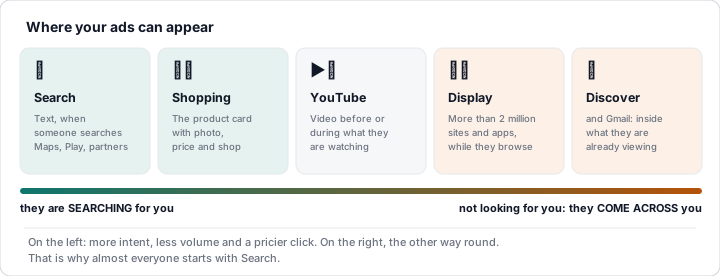
Search Network
The text ads that appear above or below the results when somebody searches for something. Also on the Shopping tab, in Google Maps and in Google Play. This is the network of intent: the person is asking for something right now. That is why it is almost always where you start.
It includes search partners: hundreds of sites that do not belong to Google but show its results (and its ads). They are switched on with a checkbox, and it is worth knowing they exist, because their quality varies enormously.
Display Network
More than two million websites, videos and apps that give Google space to show ads (image, text or video), including Google's own properties such as Gmail, YouTube or Blogger. This is the network of reach: the person is not searching, they are reading, watching or playing, and you slip in. Far cheaper per impression, far less intentional... and the place where most money is lost when nobody is watching.
YouTube
Video ads before, during or alongside videos, plus ads in YouTube's own search results. Technically it is part of Display, but it is managed with dedicated video campaigns.
Shopping
Product listings with photo, price and shop that appear in the search engine and on the Shopping tab. They come from a data feed (your catalogue) and not from keywords: a very different way of working that deserves its own module.
Other space: Discover, Gmail, Maps, apps
Google keeps opening up inventory: the Discover feed on mobile, the Promotions tab in Gmail, Maps listings, apps in the Play Store. Several modern campaign types (Performance Max, Demand Gen) buy in many of these places at once and decide the split on their own.
What campaign types does Google Ads have?
- Search: text next to the results; you choose keywords.
- Display: banners on websites and apps; you choose audiences and sites.
- Video: ads on YouTube.
- Shopping: product listings from your catalogue.
- App: promoting an app across every network.
- Demand Gen: visual creatives on YouTube, Discover and Gmail.
- Performance Max: a single type that buys across ALL the networks with total automation.
The classic types (Search, Display, Video, Shopping) let you decide where and how. The modern ones (PMax, Demand Gen) ask for trust: you supply the goal, the budget and the creatives, and Google does the allocating. When each one is the right choice is one of the big questions this course answers.
💡 Ninja trick: the question "which network is my money going to?" is the most important one in an account, and the one the interface answers worst in automated campaigns. When you reach the Intermediate and Advanced levels you will see how that box gets opened — and how our scripts check every night that the spend is where you want it.
How much does it cost to advertise on Google Ads?
Google Ads has no price list: you pay for results, and there are several models:
- CPC (cost per click): you only pay when somebody clicks. The standard in Search.
- CPM (cost per thousand impressions): you pay to show the ad, clicked or not. Common in Display and video when you are after awareness.
- CPV (cost per view): you pay when somebody watches your video (or part of it).
- Target CPA / ROAS: with automated bidding you tell Google how much you want to pay per conversion, or how much you want to earn per euro, and it adjusts the bid in each auction to try to hit it.
The starting figure is yours to set with the daily budget: Google will never spend more than ~30.4 times that amount in a month, although it can go over on any given day (we will cover this in the budgets module).
What you should remember
- Google Ads buys space across Google's networks: Search (intent), Display (reach), YouTube, Shopping and the newer inventory (Discover, Gmail, Maps).
- Paid and organic complement each other: Ads gives speed and data; SEO gives stability.
- The campaign type decides where you appear and how much control you have: the classic ones let you decide, the automated ones decide for you.
- There is no price list: you pay per click, impression, view or result.
In the next lesson we get into the mechanism that decides everything: the auction held on every single search.