In short: Google Ads metrics are a chain, not a list: impression → click → visit → conversion → sale. Each one is the result of the previous one, and each link has its ratio (CTR, CPC, CPA, ROAS). Looking at a single metric on its own leads to false conclusions; what diagnoses a problem is seeing which link the chain breaks at.
Google Ads has hundreds of columns. The ones you genuinely need in order to understand an account fit on one and a half hands. This lesson explains them as a chain — because that is what they are: a chain, where each metric is the result of the previous one, from your ad appearing to somebody buying.
How do Google Ads metrics chain together?
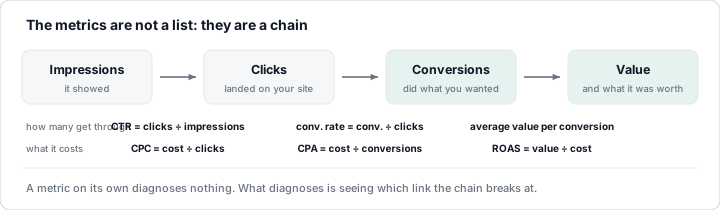
Every arrow in the chain has one metric that measures "how many get through" and another that measures "how much it costs".
1. Impressions
How many times your ad has been shown. An impression does not mean anybody looked at it: only that it appeared on the page. It is raw volume.
2. Clicks
How many times somebody clicked the ad (on the headline, the phone number, a sitelink...). It is traffic to your website.
3. CTR — click-through rate
clicks ÷ impressions. If out of 100 times you appear you get 5 clicks, your
CTR is 5%. It measures how appealing the ad is for that search: the first
symptom of whether your message connects. A low CTR in Search usually means an
ad that is not relevant enough, a low position or keywords that are too broad.
4. Cost
What you have paid over the period. The only metric that needs no explanation... and the one everybody looks at first, when it should be looked at last.
5. Average CPC — cost per click
cost ÷ clicks. How much, on average, each visit costs you. Remember the
auction lesson: average CPC is the average of thousands of different auctions;
it goes up with competition and down with quality.
6. Conversions
How many times somebody, after the click, did the action you defined: purchase, form, call, sign-up... Google does not know what a conversion means to you until you tell it (the Measurement module shows you how). Without properly measured conversions, everything else is decoration.
7. Conversion rate
conversions ÷ clicks. Out of every 100 visits, how many convert. It measures
the quality of the traffic and of your website at the same time: whether
the ad brings the right people and whether the page does its job.
8. CPA — cost per conversion
cost ÷ conversions. How much it costs you to get each lead or each sale. It
is the headline metric for lead generation businesses (forms, calls,
quotes): compared with what a customer is worth, it tells you whether the
campaign is profitable.
9. Conversion value and ROAS
The value is the money the conversions generated (the amount of each sale,
if you measure it). ROAS (return on ad spend) is value ÷ cost: for every
euro invested, how much you take in. A ROAS of 4 means €4 of sales for every
euro of advertising. It is the headline metric for ecommerce — and it has a
catch: ROAS is not profit, because it does not deduct the cost of the product.
Later on we will look at POAS (return on profit).
10. Impression share (IS)
Out of all the times you could have appeared, how many you actually did. An IS of 40% means you are missing 60% of the searches. Google also tells you why you are missing them: budget (the day's money ran out) or rank (you did not clear the threshold). It is the metric that answers "can I grow?".
Which metric should I look at in each case?
| Question | Metric |
|---|---|
| Am I being seen? | Impressions, impression share |
| Does my ad connect? | CTR |
| Am I paying a sensible price per visit? | Average CPC |
| Does my site convert the traffic it gets? | Conversion rate |
| Is acquiring customers this way profitable? | CPA (lead gen) · ROAS (ecommerce) |
| Can I grow, and what is holding me back? | Lost IS (budget) vs lost IS (rank) |
What are the most common mistakes when reading metrics?
- Looking at cost without the CPA. Spending more is not bad if each conversion comes in at the same price: that is growth.
- Chasing CTR for its own sake. A "clickbait" ad raises CTR and sinks the conversion rate. The chain is judged as a whole.
- Comparing CPCs across different sectors or campaigns. A CPC of €3 is expensive for a T-shirt ecommerce and a bargain for a law firm.
- Mistaking ROAS for profit. On a 30% margin, a ROAS of 3 is losing money.
- Judging on too little data. 40 clicks and 1 conversion say nothing: statistics need volume before they are entitled to an opinion.
💡 Ninja trick: the metrics in the interface tell you what has happened, but not where to look. That is precisely the job of the Suite's scripts: they cross-check these ten figures every night, campaign by campaign, and only alert you when something falls outside the normal range — CPA through the roof, IS lost to budget, CTR collapsing in a campaign that used to work. You read the alert, not the tables.
What you should remember
- The metrics are a chain: impressions → clicks → conversions → value. Every link has a "how many get through" figure and a "how much it costs" one.
- CPA for lead generation, ROAS for ecommerce; neither exists without properly measured conversions.
- Impression share answers whether you can grow and what is holding you back.
- Never judge a metric on its own or on too little data: the chain is read as a whole.